

| User query: I have been using a Yahoo Mail account for a long time, and thousands of emails and attachments are stored in my account. I recently launched a domain and want to move emails from Yahoo Mail to an IMAP (domain email) account. My ultimate goal is to move important emails from Yahoo to IMAP and free up some occupied storage space in my Yahoo account. So, I’m looking for a tool to do that. |
Now, with the introduction of IMAP email clients such as Microsoft Outlook and Mozilla Thunderbird, many users want to switch from one Yahoo Mail server to another IMAP server. Since Yahoo Mail does not have a built-in feature to transfer or migrate emails to another IMAP account, users need to use third-party applications. In this blog, we explained eSoftTools IMAP Backup & Migration software, which can quickly and accurately migrate emails from Yahoo Mail to IMAP server.
What is an IMAP mail server?
An IMAP server is a mail server where emails are stored on a remote system and allows users to access their mails securely through an active Internet connection. Moreover, Through the Internet, users can easily view, read or manage their emails from any device (computer, laptop, tablet or mobile phone). Moreover, All types of changes, such as email reading status, deletion or moving of emails, are synchronized in real time on the server. So, Most email clients like MS Outlook, Mozilla Thunderbird and others connect to the mail server through IMAP to view and manage emails on users’ desktop computers or mobile devices.
Why move emails from Yahoo Mail to IMAP server?
Transferring emails from Yahoo Mail to IMAP server depends on user requirements. It involves various benefits, such as ease of access to emails, the need to create a backup of important messages, and the decision to move from free Yahoo email services to a hosted mail account. Below, we have listed some benefits of moving emails from Yahoo Mail to IMAP account:
Create a backup of important emails: Keep a secure backup of important Yahoo emails on a reliable mail server or hosting platform.
Easy access to emails: Once a user transfers their Yahoo emails to an IMAP server, they can easily view and manage their emails from any device (desktop, laptop or mobile). Moreover, Real-time sync keeps everything up to date across all devices.
Moving from free email to business Use your own domain-based IMAP email account to make your email communications professional and reputable.
Storage space management: When a lot of emails are collected in Yahoo mail account, the user may face an error of reaching the storage limit. At this point, moving old emails to IMAP account becomes helpful in freeing up storage space in your Yahoo account.
Offline email access: In addition, IMAP clients such as Outlook or Thunderbird allow users to download emails for offline viewing.
Manual way to migrate Yahoo mail to IMAP server
As we know, Yahoo Mail does not have a built-in feature to transfer Yahoo emails to IMAP account, so user needs to follow multiple steps if they are trying manual transfer. First, the user needs to install MS Outlook and properly configure the Yahoo account in Outlook. After successful configuration, they can export their Yahoo emails to PST file and then configure the IMAP account again in Outlook.
Once both accounts are added to Outlook, the user can transfer emails directly from the Yahoo account to the IMAP account within Outlook.
Disadvantages of the manual method
- A very time consuming process: Manual account configuration and transfer of emails take a long time when the mailbox contains several thousand emails with attachments.
- Risk of data loss: Any error during export or transfer may result in lost or corrupted emails.
- No option to move selective mail folder: The manual process handles the entire mailbox, even when the user only needs a few mail folders to move.
- Possible sync errors: If at any time the Internet connection drops or MS Outlook crashes, the entire transfer process may fail, synchronization will stop, and repeating the process may create duplicate emails.
Automatic way to migrate Yahoo mail to IMAP server
However, the manual process suggested above is lengthy and requires technical knowledge. To save time and avoid data loss, it is recommended to use an automated tool such as eSoftTools IMAP backup and migration software For direct and secure transfer of Yahoo emails to any IMAP server. So, this tool migrates all mail folders like inbox, drafts, sent, etc. from Yahoo mail to IMAP account directly and easily.
this IMAP backup and migration software Accurately maintains folder hierarchy and email meta properties such as To, Bcc, Subject, Sender and Recipient information during migration.
How to migrate Yahoo mail to IMAP server?
- First, download and install eSoftTools IMAP backup and migration software On your Windows computer.
- He chooses yahoo mail From the Server Options menu.
- Enter your Yahoo Mail account credentials, such as your data Email address and Application password.
- Click the Sign In button, and download all Yahoo Mail folders.
- Get a preview of Yahoo Mail mailbox folders in tree structure.
- Select the necessary folders for your Yahoo Mail mailbox.
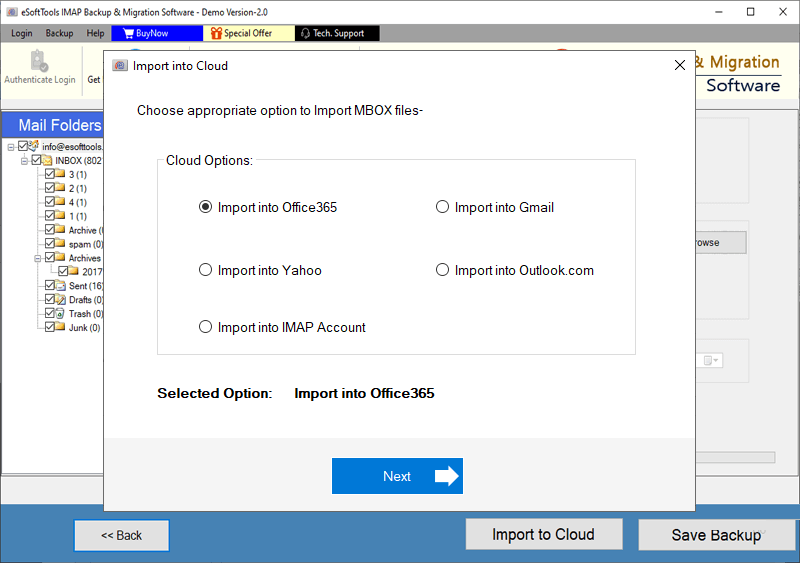
- Click on Import to the cloud button and select Import to IMAP option.
- Enter your IMAP email account email address, password, and IMAP details.
- Finally, click Import to IMAP, The software will migrate Yahoo emails to your IMAP email account.
Screenshot of the program:
Why choose IMAP Backup & Migration?
- Backup Yahoo mail to different file formats like PST, MSG, MBOX, EML, EMLX, HTML, MHTML, PDF and Thunderbird.
- Migrate Yahoo Mail to a cloud application such as Gmail, Office 365, Outlook.com, and IMAP email account.
- Emails can be filtered by date by selecting the time range (from and to).
- Option to migrate only selected folders.
- You can easily install in all versions of Windows operating system from Windows 11 to earlier versions.
- The graphical interface is easy to use and anyone can use it.
conclusion
Migrating Yahoo mail to an IMAP server provides many benefits, such as creating a backup and protecting emails from unwanted threats such as virus attacks. The manual method is free but requires technical expertise and is not suitable for large mailboxes. automated solution, eSoftTools IMAP Backup and Migration It is a reliable and result-oriented tool that maintains folder hierarchy and email properties. This software is designed so that it can be easily used by professionals and beginners.
Frequently Asked Questions (FAQ):
The answer. Yes, The software maintains folder hierarchy and email properties during migration from Yahoo Mail to IMAP server.
The answer. Yesthe program displays all folders in a tree-like hierarchy. In addition, It allows users to select only the folders required for migration.
The answer. Yes, This software works on all versions of Windows operating system, such as Windows 11, 10, 8.1, 8, 7 and earlier.
The answer. Yes, eSoftTools IMAP Backup & Migration software has an email filtering feature. This feature allows you to specify and migrate the time range.
The answer. YesThis software provides multiple backup options for Yahoo Mail. In fact, Outlook PST is one of the available formats that users can choose to backup their Yahoo emails.
The answer. Yes, the program provides 8 different options for naming conventions. Moreover, It allows users to name the output file using the email subject or other details as needed.
The answer. There are no limits set in the software for licensed users; Unlimited immigration is allowed.